YTPI: A LAN-First YouTube Downloader for a Home Server
A current guide to YTPI, a Flask and yt-dlp downloader with a Material-style dashboard, persistent jobs, playlist synchronization, and LAN-only access.
I originally built YTPI because running yt-dlp commands manually on an always-on home server was repetitive. I wanted to submit a video or playlist from any device on my LAN, choose where it should go, and see what happened without opening a shell on the server.
The project has grown beyond that first download form. The current repository is here:
It is still intentionally small: a Flask application, SQLite persistence, server-rendered templates, a little browser JavaScript, and yt-dlp running in background workers. There is no frontend build step and no hosted service in the middle.
What YTPI does now
The application supports:
- One or many video, playlist, or mixed URLs in a single submission
- MP4 video downloads or audio-only MP3/WAV extraction
- Quality selection from maximum through 480p
- Categories and sanitized custom destination folders
- Persistent job history in SQLite
- Queue recovery after an application restart
- Timeouts, retry, cancellation, queue limits, and bounded stored output
- A live dashboard with progress, status, concise error summaries, and technical job details
- Saved playlists with editable download settings and later synchronization
- Health and readiness probes for service monitoring
- An optional token-protected GET share endpoint for iOS shortcut compatibility
The security boundary is deliberately conservative: every request is checked against a configured CIDR allowlist. YTPI is designed for a trusted LAN or a properly protected reverse proxy, not for direct public exposure. A reverse proxy can be used with YTPI_TRUST_PROXY=1 when it is genuinely trusted and supplies the client address correctly.
The dashboard
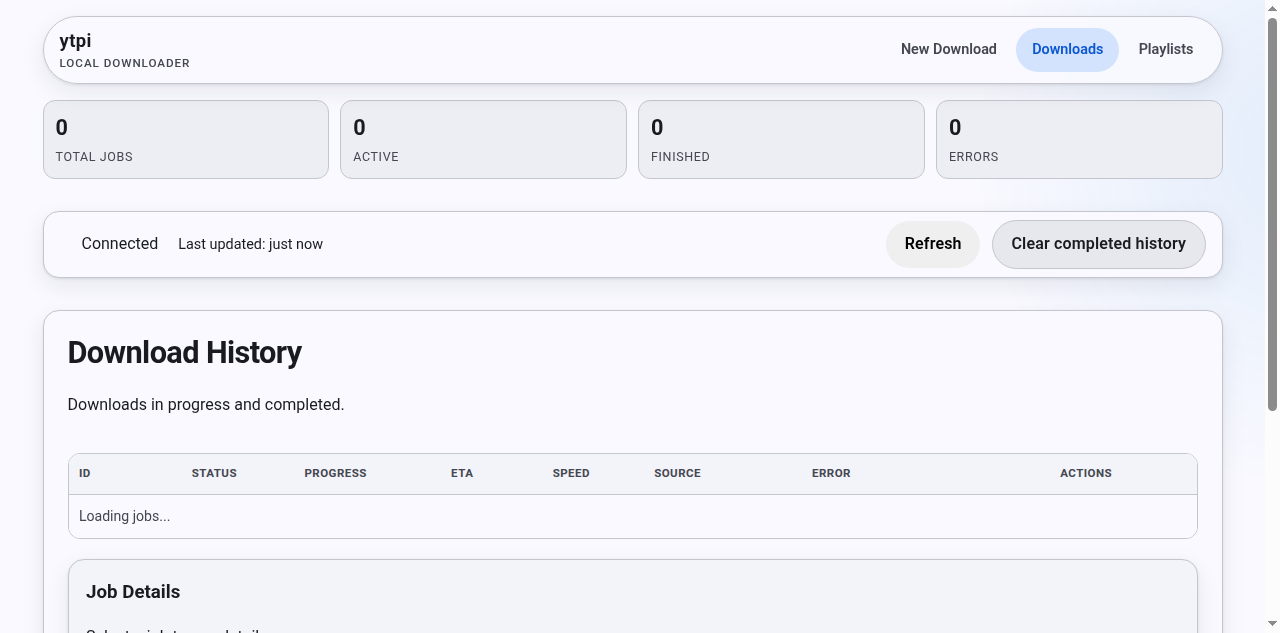
The current dashboard’s healthy empty state: KPI cards, connection status, download history, job details, and the saved-playlists area. The screenshot was captured before any jobs were queued, so the empty counters are intentional.
The dashboard separates the short version of a failure from the technical record. That keeps the history table readable while still making the downloader output available when I need to diagnose a job. It also exposes connection state and refresh controls rather than leaving a user staring at a stale table.
Playlist management is no longer just a URL shortcut
When a playlist is submitted, YTPI saves it as a playlist record. When yt-dlp reports a friendly title, that title is retained for the dashboard; a later response that only contains the playlist ID does not overwrite it with a less useful identifier.
From the Playlists area, I can update the category, quality, audio-only setting, and audio format. A sync request becomes an asynchronous job, and the result is tracked with discovered, downloaded, already-present, and failed item counts. That makes a repeat sync useful for keeping a home media library current instead of blindly re-queueing the original URL.
How a download moves through the system
- The browser or API submits one or more URLs.
- Flask validates the URL, requested quality, audio format, category, and request size.
- Accepted work is persisted in SQLite and added to the worker queue.
- A background worker invokes
yt-dlp, optionally with its remote JavaScript components, and captures bounded output. - Job progress and terminal state are written back to SQLite.
- The dashboard polls the status API and can show progress, details, cancellation, or retry actions.
Jobs move through queued, downloading, and one of finished, error, or cancelled. Because the queue is persisted, a process restart does not turn the history into an in-memory mystery; queued work can be recovered on startup.
Running it locally
The repository includes a small local setup:
1
2
3
4
5
cp .env.example .env
python3 -m venv .venv
source .venv/bin/activate
pip install -r requirements.txt
python app.py
Then open http://localhost:7434. The development server is useful for local work; the Docker image runs the app with Waitress.
For a containerized deployment:
1
2
3
4
docker compose up -d --build
docker compose ps
curl http://localhost:7434/healthz
curl http://localhost:7434/readyz
The Compose setup persists SQLite data under data/, mounts a configurable media directory, publishes port 7434, applies resource limits, restarts unless stopped, and includes a health check. Set YTPI_HOST_DOWNLOADS_DIR to choose a different host directory rather than editing the Compose file.
The repository also has two manually dispatched self-hosted GitHub Actions workflows. One updates a systemd installation; the Docker workflow preserves deployment data, runs the test suite, recreates the service, waits for container health, and probes /healthz. Those workflows contain host-specific paths and are not a generic hosted deployment recipe.
API and automation
The browser is not the only client. A JSON request can queue a job and receive a 202 response with its job ID:
1
2
3
curl -X POST http://localhost:7434/download \
  -H "Content-Type: application/json" \
  -d '{"url":"https://youtube.com/watch?v=VIDEO_ID","quality":"1080","category":"Music"}'
The API also exposes paginated job status, individual job output, cancellation, retry, playlist listing and updates, playlist synchronization, and the health/readiness probes. Every one of those routes remains behind the same access guard.
For a shortcut integration, /share can accept a GET request when enabled and configured with YTPI_SHARE_TOKEN. Without the token, the endpoint refuses the request rather than acting as an unauthenticated cross-site queue.
Testing and boundaries
The project uses pytest -q. Tests build the Flask app with temporary SQLite and download paths, no workers, and an allowlisted localhost address. The Docker deployment workflow runs the same suite before recreating the service.
The main operational boundaries are worth stating plainly:
- YTPI does not add user authentication. Put it behind an authenticated reverse proxy if the network boundary is not enough.
- URL validation and literal private-address blocking are configurable; hostname resolution is not performed by the private-address option.
- Downloads are subject to the terms and availability of the source service. YTPI is a local queue and organization layer around
yt-dlp, not a way around those rules. yt-dlp,ffmpeg, and the JavaScript runtime used by the configured remote components need to be available in the chosen installation.
Why I still like the project
YTPI remains useful because it solves a specific home-server problem without turning into a platform. I can queue a lecture from my phone, keep a playlist organized, see whether a download failed, and inspect the details when something changes upstream. SQLite, a few background workers, a LAN allowlist, and a small dashboard are enough for that job.
If you want to run it yourself, start with the repository README. It is the source of truth for the current environment variables, API routes, Docker configuration, tests, and deployment workflow details.